Product design & workflow automation · February 2026-Present
NOW Cleaner - course content automation tool
An AI-assisted desktop tool designed to help fellow students organise NTU course exports, review changes between downloads and prepare grouped NotebookLM upload files.
Workflow and product requirements, user experience, testing and refinement; direction of AI-assisted implementation and packaging
Inside this case study 8 sections
From course downloads to usable study material
NTU NOW course exports arrive as ZIP files containing teaching material in nested folders. Preparing those files for NotebookLM means organising the documents, deciding what to group together and keeping track of what has changed when another export arrives.
I developed NOW Cleaner to help fellow students organise their downloaded course material and prepare it for NotebookLM, including those who don’t want to use scripts or set up Python.
NOW Cleaner began as a one-off cleaner for these downloads. I developed the product into a desktop workflow with saved modules, change review and stable upload packs, so each new export can be handled as an update rather than a fresh start.
The tool processes exports the user supplies. It does not download from NOW, monitor learning rooms or directly control NotebookLM.
View the repository and installation guides
The walkthrough above uses fictional course material. It follows an initial import, a later module update and manual uploads to NotebookLM. It is an edited demonstration, not a processing-speed benchmark or evidence of automatic NotebookLM synchronisation.
My contribution
I designed the workflow, defined the product requirements and user experience, and led testing and refinement of NOW Cleaner.
My work included shaping the saved-module process, reviewing how changes and conflicts should be presented, and refining the interface around one clear next action. I directed changes throughout development, tested behaviour and reviewed the outputs.
Codex was used as an AI coding assistant throughout implementation, debugging and packaging. This is AI-assisted development, not a claim that I independently hand-coded the application end to end.
Reviewing an update before replacing files
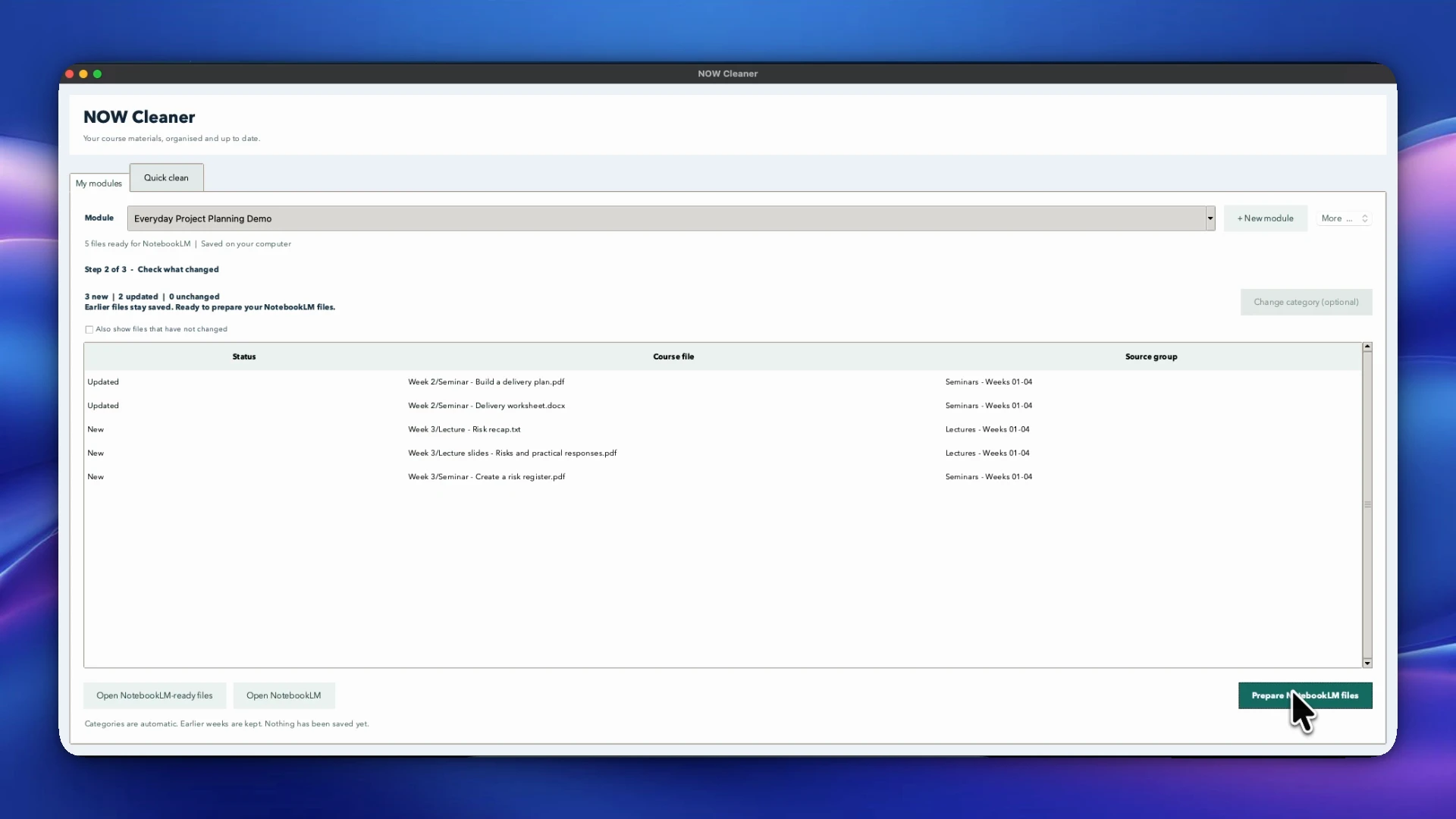
A later course download may contain new material, revised documents or files already imported. Missing files do not necessarily mean earlier weeks should be deleted: the new ZIP might only cover part of the module.
The saved-module workflow compares original course paths and SHA-256 content hashes rather than relying on archive names or timestamps. It presents additions, changes, duplicates, conflicting versions and possible renames for review.
Partial imports preserve earlier material. Complete-export mode allows removals only with explicit approval. Original documents stay locally, with recoverable revision history after an update is saved.
This makes the distinction between adding material and replacing a complete module part of the product’s behaviour, rather than leaving it to the user to remember.
Keeping upload packs stable
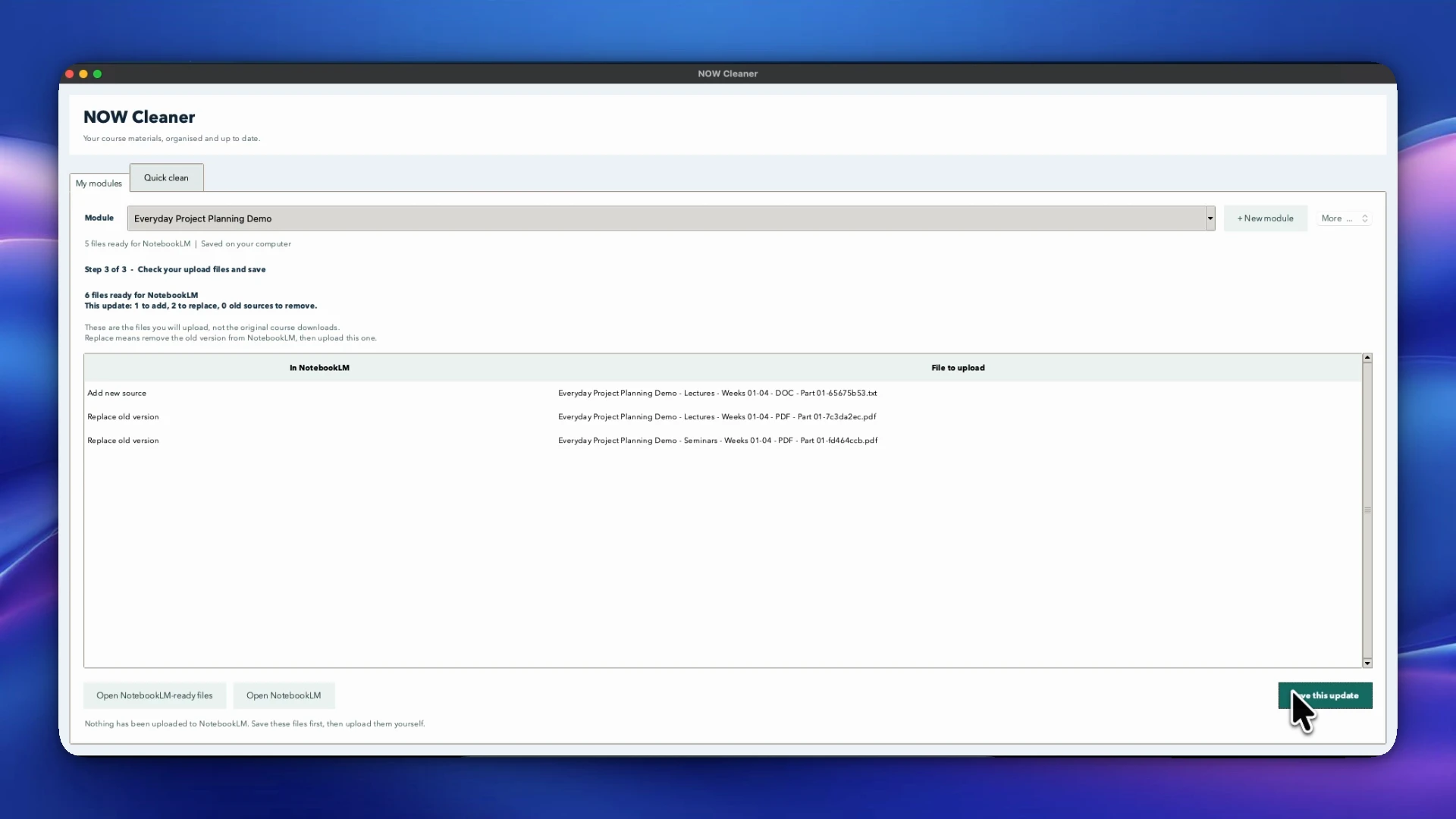
The original cleaner offered optional similarity merging. For saved modules, the product uses saved grouping instead of regrouping files by similarity on each import.
Lecture and seminar material is grouped into four-week ranges, alongside assessment and reference groups. Text packs and visual PDF packs include filenames or section headings so the grouped material remains identifiable. Oversized groups are split into numbered parts.
The default source budget is 50, with 15 spaces reserved for other uploads. This is a configurable planning estimate, not a live reading of NotebookLM’s limits or the user’s actual source count.
After saving an update, local “Latest Update” files and a replacement checklist identify the packs to add, replace or retire. NotebookLM uploads and replacements still require the user’s action.
Visual Word and PowerPoint packs require LibreOffice installed separately. Conversion failures are reported rather than silently dropping files; scanned PDFs are not OCR-transcribed, and visual packs do not preserve every Office feature or animation.
Making the desktop workflow easier to follow
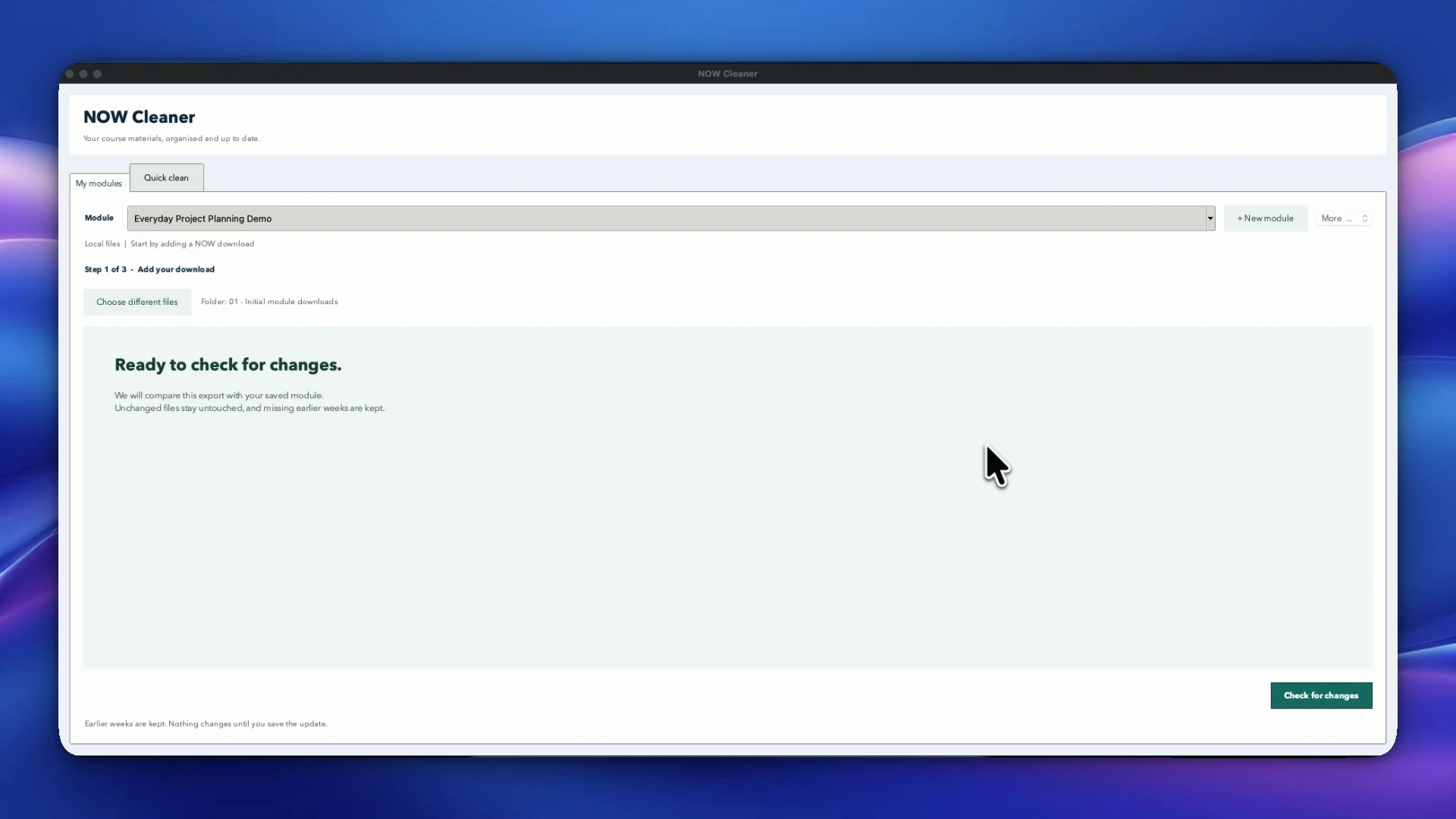
The interface starts with a module name. Technical options are secondary, while each stage presents one prominent next action: add a download, review changes, prepare upload files and save the update.
Users can select one ZIP, several ZIPs or a folder of ZIPs without extracting them first. Unchanged files are hidden by default, keeping attention on changes and decisions. Progress feedback, file-opening actions and update history support the surrounding work.
The downloadable apps bundle Python, so fellow students can use the local workflow without setting up a development environment. Visual Office packs still need LibreOffice installed separately.
I refined these steps through testing and review rather than treating a technically working process as a finished user experience.
Adapting the product for Mac and Windows
The Apple-silicon Mac release bundles Python and its dependencies in a drag-to-Applications installer. The Windows preview provides a per-user installer, Start-menu shortcut and uninstaller, also with Python bundled.
Windows required platform-specific handling for file opening, storage, locks and filenames. It opens committed revision folders directly instead of depending on the folder links used on Mac, avoiding privileged symlink requirements.
The Windows preview is local-only: Google Drive is disabled, cross-drive module destinations are unsupported, and the installer targets Windows 10/11 x64 Intel/AMD PCs. The Mac download does not cover Intel Macs.
Both releases have distribution limitations. The Mac app is ad-hoc signed rather than Apple Developer ID-signed or notarized; the Windows installer is unsigned. First-launch security warnings may appear. Installation guidance explains these limitations without asking users to disable operating-system protections.
Local processing and optional integrations
Local module processing does not require a Google connection or an OpenAI key. The application has no developer-operated collection backend or application telemetry identified in the documented source review. Local course files and history are not encrypted by the app.
The optional one-off naming feature sends ZIP filename stems to OpenAI when a key is configured, not document contents. Module naming does not use AI.
The macOS Drive implementation uses desktop OAuth, narrow drive.file permission and Keychain token storage. It retains Drive file identities and checks for external edits before replacement. Sending packs to Drive shares their contents with Google.
Live Google consent and NotebookLM sync have not been verified in the supplied evidence. The application separates a successful Drive upload from pending NotebookLM sync and requires a synthetic test with manual confirmation before real uploads. I do not present automatic NotebookLM synchronisation as a proven capability.
Testing and current release
The project includes automated tests using fictional content, native interface checks, and Mac and Windows CI checks. The release handoff also records frozen-executable and installed-app checks for the Windows preview. These support the tested workflows, not a claim of complete compatibility or security certification.
The implementation includes bounded archive extraction, unsafe-path and collision rejection, module locking, staged updates and output ownership checks. These controls do not make the tool a malware scanner or a complete sandbox for document converters.
Downloadable releases are available for Apple-silicon Macs and Windows x64 PCs. The walkthrough and stills show the Mac workflow using fictional material; they do not establish Windows compatibility or wider student adoption. Wider hands-on Windows testing remains a next step. Windows Drive support, Intel Mac builds and automatic updates are not implemented.
- Mac v0.1.0 and installation details
- Windows v0.2.0 preview and installation details
- Privacy and data-flow documentation
NOW Cleaner is an independent student project, not an NTU-affiliated or endorsed product. Its code is source-available under PolyForm Noncommercial 1.0.0, not an open-source licence. No measured time saving, peer adoption or commercial outcome is claimed.